- "Wah... you so free ah today, surfing net only..." said by colleague
- "Wah!!! You made so little changes and charge me 1 man-day ah??!!" said by client
- "I need a timeline for this support effort!" said by client
- "Urgent! Please resolved A.S.A.P!" said by client
- "What take you so long to solve this?" said by client
- "Once the system on live, is no longer our problem, is support problem." said by colleague
- "Hey dude, I found a bug in the system, but I guess user doesn't know. Why not I deploy to live first, and you support guys fix it later." said by colleague
- "Support is so important you know?!" said by colleague
- "Have you Google for your problem yet?" said by colleague
- "You already Google? Have you tried Yahoo! then?" said by colleague
Showing posts with label Information. Show all posts
Showing posts with label Information. Show all posts
Thursday, June 25, 2009
Forbidden Words to I.T. Support Personnel
There are always words that you feel extra sensitive on, same goes to experts like I.T. Support. Here are some of the top words that can kill the day of an I.T. Support [does not follow by sequence, since all carries equal damage]:


Tuesday, June 16, 2009
Why I use Mozilla Firefox?
I'd actually used a lot of browser before I settle down with Mozilla Firefox. Opera and Safari are the browsers that I'd used for many years, I fancy Speed Dial from Opera and the appearance of Safari, but both of them are not perfect browser to me. I often faced difficulties when come to downloading with Safari, but Opera looks quite dull sometimes. Until I found Firefox with its tremendous of add-ons, I finally found my best browser. Just some sharing on what kind of add-ons actually move me to use Mozilla Firefox :
AnyColor: https://addons.mozilla.org/en-US/firefox/addon/6991

AnyColor is the add-on that allows you to make your browser looks more colorful, also with glossy effects. My Firefox is in sky blue now :)
Download Statusbar: https://addons.mozilla.org/en-US/firefox/addon/26

Download Statusbar replaces the annoying download window that gets in your way when browsing.
Firebug: https://addons.mozilla.org/en-US/firefox/addon/1843

Now, with Firebug, web developer can easily view and edit CSS, HTML, and JavaScript in any website he/she is browsing. A good debugging tool.
FoxTab: https://addons.mozilla.org/en-US/firefox/addon/8879

Very often I having problem to navigate through tabs if they went beyond the width of my browser, but not anymore. FoxTab gives you a quick glance on all your open tabs, and it is more than what you can see from the image above.
FoxyTunes: https://addons.mozilla.org/en-US/firefox/addon/219

Cool... I have save few clicks to open my music player while I'm browsing. Instead, my player is now embedded within my Firefox. Very impressive on the amount of players that it can support. Must get this add-on!
GooglePreview: https://addons.mozilla.org/en-US/firefox/addon/189

By having this add-on, you can now have a first glance on your Google search result, plus those links also come with rating to show how reliable the results are to you.
Interclue: https://addons.mozilla.org/en-US/firefox/addon/4999

With Interclue, you will be able to know what is behind the link without needed to click on it. It gives you almost every information you need to know about the page that connected to the link :)
Personas: https://addons.mozilla.org/en-US/firefox/addon/10900

Not only color, you can now have your own theme for your Firefox ranging from categories like abstract, sports, websites, music, and etc.
Quick TransLation: https://addons.mozilla.org/en-US/firefox/addon/5641

As the name implies, it is a quick translation tool. Just set your language or country to translate, then highlight the word you want to translate in the web page. Viola! you will have your word being translated!
QuickNote: https://addons.mozilla.org/en-US/firefox/addon/46

Since Opera comes with notepad, I just want my Firefox to have one as well. In fact, it is quite a useful and handy add-on.
Speed Dial: https://addons.mozilla.org/en-US/firefox/addon/4810

This is the one I'm talking about. Speed Dial! It works exactly the same as the Opera but it is much more customizable. You can have any number of rows and columns for your speed dial, and you can even have multiple tabs to have different set of speed dial. What a brilliant idea.
Tab Scope: https://addons.mozilla.org/en-US/firefox/addon/4882

With this add-on, you can now view your inactive tab by just hover you mouse cursor on the tab. Other than previewing the web content, you can also perform basic navigation from the scope, such as "Back", "Refresh", "Close", and etc. Cool!
The Nethernet: https://addons.mozilla.org/en-US/firefox/addon/6336

No joke. This is a MMORPG where you can play with your Firefox. A simple yet addictive game that only requires you to browse around the Internet, but there are mines and traps around :)
Well, these are the add-ons that I have in my Firefox - my favorite web browser.
AnyColor: https://addons.mozilla.org/en-US/firefox/addon/6991

AnyColor is the add-on that allows you to make your browser looks more colorful, also with glossy effects. My Firefox is in sky blue now :)
Download Statusbar: https://addons.mozilla.org/en-US/firefox/addon/26

Download Statusbar replaces the annoying download window that gets in your way when browsing.
Firebug: https://addons.mozilla.org/en-US/firefox/addon/1843

Now, with Firebug, web developer can easily view and edit CSS, HTML, and JavaScript in any website he/she is browsing. A good debugging tool.
FoxTab: https://addons.mozilla.org/en-US/firefox/addon/8879

Very often I having problem to navigate through tabs if they went beyond the width of my browser, but not anymore. FoxTab gives you a quick glance on all your open tabs, and it is more than what you can see from the image above.
FoxyTunes: https://addons.mozilla.org/en-US/firefox/addon/219

Cool... I have save few clicks to open my music player while I'm browsing. Instead, my player is now embedded within my Firefox. Very impressive on the amount of players that it can support. Must get this add-on!
GooglePreview: https://addons.mozilla.org/en-US/firefox/addon/189

By having this add-on, you can now have a first glance on your Google search result, plus those links also come with rating to show how reliable the results are to you.
Interclue: https://addons.mozilla.org/en-US/firefox/addon/4999

With Interclue, you will be able to know what is behind the link without needed to click on it. It gives you almost every information you need to know about the page that connected to the link :)
Personas: https://addons.mozilla.org/en-US/firefox/addon/10900

Not only color, you can now have your own theme for your Firefox ranging from categories like abstract, sports, websites, music, and etc.
Quick TransLation: https://addons.mozilla.org/en-US/firefox/addon/5641

As the name implies, it is a quick translation tool. Just set your language or country to translate, then highlight the word you want to translate in the web page. Viola! you will have your word being translated!
QuickNote: https://addons.mozilla.org/en-US/firefox/addon/46

Since Opera comes with notepad, I just want my Firefox to have one as well. In fact, it is quite a useful and handy add-on.
Speed Dial: https://addons.mozilla.org/en-US/firefox/addon/4810

This is the one I'm talking about. Speed Dial! It works exactly the same as the Opera but it is much more customizable. You can have any number of rows and columns for your speed dial, and you can even have multiple tabs to have different set of speed dial. What a brilliant idea.
Tab Scope: https://addons.mozilla.org/en-US/firefox/addon/4882

With this add-on, you can now view your inactive tab by just hover you mouse cursor on the tab. Other than previewing the web content, you can also perform basic navigation from the scope, such as "Back", "Refresh", "Close", and etc. Cool!
The Nethernet: https://addons.mozilla.org/en-US/firefox/addon/6336

No joke. This is a MMORPG where you can play with your Firefox. A simple yet addictive game that only requires you to browse around the Internet, but there are mines and traps around :)
Well, these are the add-ons that I have in my Firefox - my favorite web browser.
Friday, May 15, 2009
What may happen when we turn 65
I was happen to saw a simple statistic released by the Labour Department of USA. It is a projection showing that how 100 of 25 years old people tend to become after struggling for another 40 years of life:
1 Get Rich
4 Financial Free
5 Still Working
12 Bankrupt
29 Passed Away
49 Depend on Others
1 Get Rich
4 Financial Free
5 Still Working
12 Bankrupt
29 Passed Away
49 Depend on Others
Which one you wanna be?
Friday, April 10, 2009
You know its 2009 when...
You know its 2009 when...
1. You never send letters to your friends. (Always Email)
2. You haven't played solitaire with real cards in years.
3. The reason for not staying in touch with your friends is that they don't have Email.
4. You'd rather look all over the house for the remote instead of just pushing the button on the TV.
6. Your evening activity is sitting at the computer.
7. You read this list, and keep nodding and smiling.
8. You think about how stupid you are for reading this.
9. You were too busy to notice number five.
10. You actually scrolled/looked back up to check if there was a number five.
11. And now you're laughing at your stupidity.
12. Put this in your profile if you fell for it. You know you did. (I did)
1. You never send letters to your friends. (Always Email)
2. You haven't played solitaire with real cards in years.
3. The reason for not staying in touch with your friends is that they don't have Email.
4. You'd rather look all over the house for the remote instead of just pushing the button on the TV.
6. Your evening activity is sitting at the computer.
7. You read this list, and keep nodding and smiling.
8. You think about how stupid you are for reading this.
9. You were too busy to notice number five.
10. You actually scrolled/looked back up to check if there was a number five.
11. And now you're laughing at your stupidity.
12. Put this in your profile if you fell for it. You know you did. (I did)
Friday, March 27, 2009
Useful Knowledge
My sis sent me this, I have no idea who the author is, but all credits will go to him/her :)
Emergency
The Emergency Number worldwide for Mobile
Locked your Key in the Car
Does your car have remote keyless entry? This may come in handy someday. Good reason to own a cell phone: If you lock your keys in the car and the spare keys are at home, call someone at home on their mobile phone from your cell phone. Hold your cell phone about a foot from your car door and have the person at your home press the unlock button, holding it near the mobile phone on their end. Your car will unlock. Saves someone from having to drive your keys to you. Distance is no object. You could be hundreds of miles away, and if you can reach someone who has the other 'remote' for your car, you can unlock the doors (or the trunk).
Hidden Battery Power
Imagine your mobile battery is very low.. To activate, press the keys *3370# Your mobile will restart with this reserve and the instrument will show a 50% increase in battery. This reserve will get charged when you charge your mobile next time.
Disabled Stolen Mobile Phone
To check your Mobile phone's serial number, key in the following digits on your phone: *#06#, A 15 digit code will appear on the screen. This number is unique to your handset. Write it down and keep it somewhere safe.. When your phone get stolen, you can phone your service provider and give them this code. They will then be able to block your handset so even if the thief changes the SIM card, your phone will be totally useless. You probably won't get your phone back, but at least you know that whoever stole it can't use/sell it either.
ATM - PIN Number Reversal
If you should ever be forced by a robber to withdraw money from an ATM machine, you can notify the police by entering your PIN # in reverse. For example, if your pin number is 1234, then you would put in 4321. The ATM system recognizes that your PIN number is backwards from the ATM card you placed in the machine.. The machine will still give you the money you requested, but unknown to the robber, the police will be immediately dispatched to the location. If everybody does this, there would be no point in people stealing mobile phones.
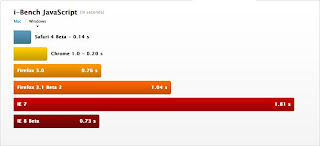
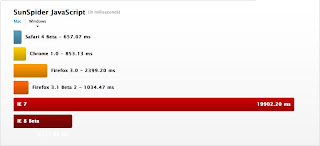
Web Browser Performance Comparison Chart
I happen to use multiple browsers like IE, Firefox, Opera, and Safari. Got these information while I'm downloading the new Safari, what do you think about it?



Monday, March 23, 2009
Validation Processing Flow
Found this while I'm cracking my head on how to do a proper validation.
Given the different kinds of validation on offer, one might ask how they are applied, and what happens when errors are produced at any stage. The following is the general flow:
- Required field validation is run first
- Perform minimum/maximum length and mask validations
- If the field still has no errors, convert to the target type and bind the property to the ActionBean
- If the field converted without errors, run any min/max value checks (for numbers)
- For fields that have no errors, evaluate expression based validations
- If there are still no errors, run custom validation (unless overridden to run with errors)
Source: http://www.stripesframework.org/display/stripes/Validation+Reference
Subscribe to:
Posts (Atom)